Skip to content
Plugin PantryPlugins

Plugins / Pantry SEO

Plugin Pantry

Pantry SEO

v1.0.0

Contents: Titles, descriptions, social cards, canonical URLs and basic schema.

26 KB, no external requests

The SEO fields every page needs and nothing you have to score. Set a title and description per post, get correct social cards, canonical tags, robots controls and Organization schema, and keep the WordPress core sitemap. There is no analysis, no traffic light and no keyword box.

Compared with the popular plugins
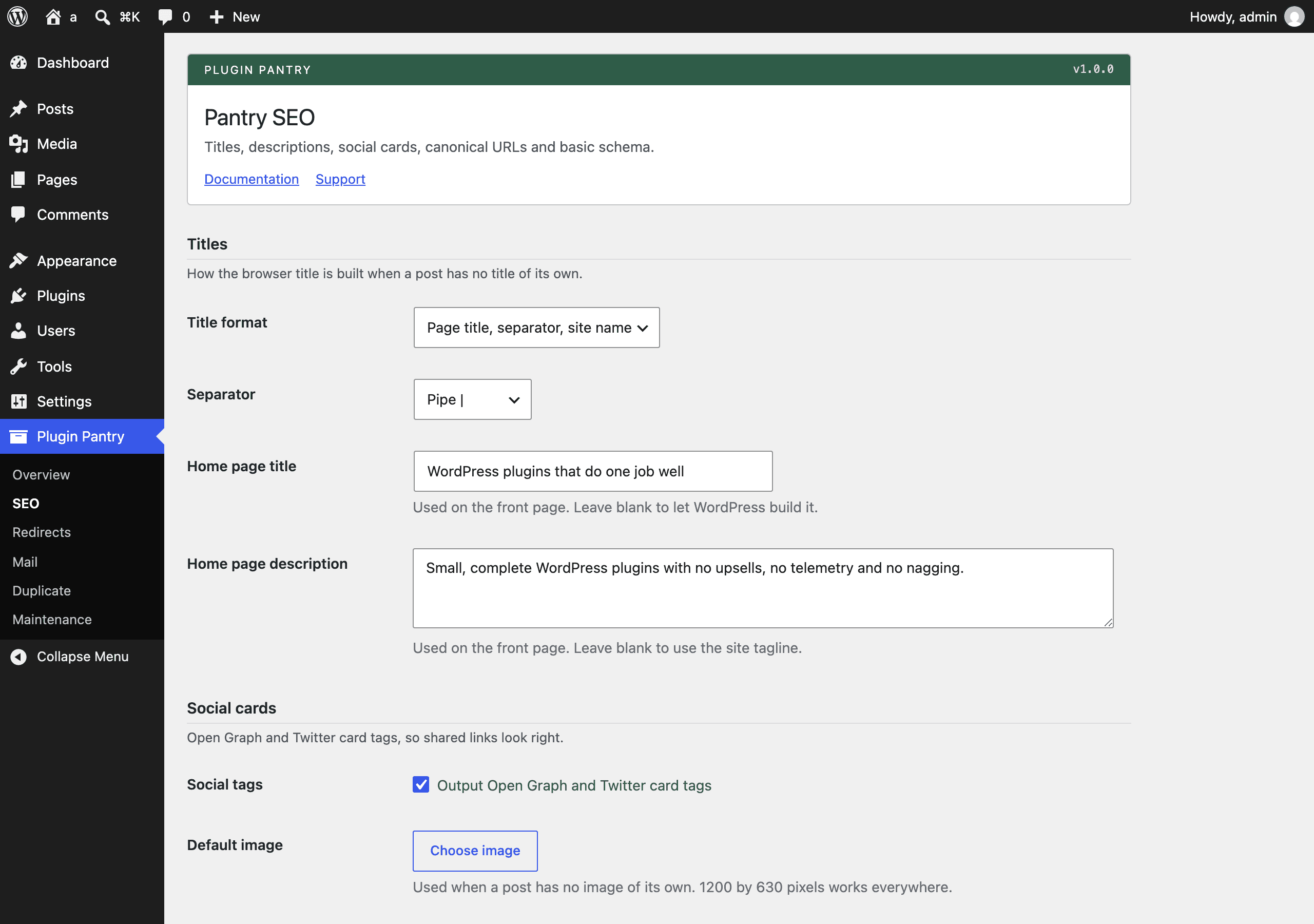
The Pantry SEO settings screen in the WordPress admin, at Settings > Pantry SEO.

What it does

  • Per-post SEO title and meta description in a plain meta box on every public post type
  • Site-wide title format with a separator and a home page title and description
  • Open Graph and Twitter card tags, with a default social image and per-post override
  • Canonical URL on singular pages, archives and paginated pages, with a per-post override
  • Robots meta per post (noindex, nofollow) and site-wide noindex for author, date and search archives
  • Organization or Person schema plus WebSite schema as JSON-LD, from a short set of fields
  • Keeps the WordPress core sitemap and adds per-post and per-post-type exclusions
  • Steps aside automatically when Yoast, Rank Math, All in One SEO, SEOPress or The SEO Framework is active, with one notice explaining why

What it does not do

  • No content analysis, readability checks, scores or traffic lights
  • No focus keyword fields
  • No redirects or 404 handling (see Pantry Redirects)
  • No breadcrumbs
  • No sitemap of its own
  • No external requests of any kind

Measured footprint

Zip size
26 KB
Lines of PHP
2,001
Options
pantry_seo_settings
Post meta
pantry_seo_title, pantry_seo_description, pantry_seo_image, pantry_seo_canonical, pantry_seo_noindex, pantry_seo_nofollow
Custom tables
none
Post types
none
Cron events
none
Transients
none
Admin assets
includes/core/assets/pantry-admin.css on the Pantry SEO settings screen only, includes/core/assets/pantry-admin.js on the Pantry SEO settings screen only
Front-end assets
none
External requests
none
Measured on
2026-09-12

Compatibility

WordPress
6.4 or newer, tested to 7.1
PHP
8.1 or newer
Where it lives
Settings > Pantry SEO
Licence
GPLv2 or later

Documentation

Titles, descriptions, social cards, canonical URLs and basic schema. The SEO fields every page needs and nothing you have to score. No content analysis, no traffic lights, no focus keyword box, and no external requests of any kind.

Pantry SEO is built to the Pantry Standard.

  • Menu: Settings > Pantry SEO
  • Text domain: pantry-seo
  • Requires: WordPress 6.4, PHP 8.1

What it does

  • A per-post SEO title, meta description, social image, canonical URL, noindex and nofollow on every public post type.
  • A site-wide title format and separator, plus a home page title and description.
  • Open Graph and Twitter card tags, with a default image and a per-post override.
  • Canonical URLs on singular pages, archives and paginated pages.
  • Site-wide noindex for author, date and search archives.
  • Organization or Person schema plus WebSite schema, as one JSON-LD graph.
  • Exclusions for the WordPress core sitemap, by post type and per post.
  • Steps aside when another SEO plugin is active.

Using it

The settings screen

Everything site-wide lives on one screen at Settings > Pantry SEO.

Setting What it does
Title format How the browser title is built: page title then site name, site name then page title, or the page title on its own. It only applies where a post has no SEO title of its own.
Separator The character between the parts of the title: hyphen, en dash, em dash, pipe, middle dot or slash. WordPress turns a spaced hyphen into an en dash when it renders the title; that is core behaviour, not a bug here.
Home page title Replaces the title on the front page. Blank leaves the WordPress title alone. Page two of a paginated front page keeps the WordPress title so the page number survives.
Home page description The meta description on the front page. Blank falls back to the site tagline.
Social tags Turns the Open Graph and Twitter card tags on or off.
Default image The social image used when a post has no image of its own. 1200 by 630 pixels works everywhere.
X (Twitter) account Becomes twitter:site. Stored without the at sign; anything that is not a letter, a digit or an underscore is removed on save.
Noindex these archives Adds noindex to author archives, date archives and search results. WordPress already noindexes search results on its own.
Schema output Turns the JSON-LD block on or off.
The site belongs to Organization or Person. Chooses the schema type and whether the image is logo or image.
Name The name in the schema. Blank uses the site title.
Logo or photo The image in the schema, from the media library.
Profile links One URL per line, each starting with http or https. They become sameAs. Lines that are not URLs are dropped on save.
Leave out of the sitemap Whole post types to drop from the WordPress sitemap.
The per-post box

Every public post type gets a Pantry SEO box under the editor. It is a classic meta box, so it works the same on the block editor and the classic editor. On the block editor it sits in the Meta Boxes drawer at the bottom of the screen.

Field What it does
SEO title Replaces the whole browser title and og:title for this post. Blank uses the post title through the site-wide format.
Meta description The description for this post. Blank uses the excerpt, then the opening of the content, cut on a word boundary at about 160 characters.
Social image URL The Open Graph and Twitter image for this post. Blank uses the featured image, then the site default.
Canonical URL Points this post somewhere else. Blank uses the permalink.
Noindex Adds noindex and removes the post from the sitemap. Posts set to noindex are labelled in the posts list.
Nofollow Adds nofollow.
What Pantry SEO prints

On wp_head, at priority 1:

<meta name="description" content="...">
<link rel="canonical" href="...">
<meta property="og:locale" content="en_US">
<meta property="og:type" content="article">
<meta property="og:title" content="...">
<meta property="og:description" content="...">
<meta property="og:url" content="...">
<meta property="og:site_name" content="...">
<meta property="og:image" content="...">
<meta property="article:published_time" content="...">
<meta property="article:modified_time" content="...">
<meta name="twitter:card" content="summary_large_image">
<meta name="twitter:title" content="...">
<meta name="twitter:description" content="...">
<meta name="twitter:image" content="...">
<script type="application/ld+json">{"@context":"https://schema.org","@graph":[...]}</script>

Robots directives are added through the core wp_robots filter, so there is one <meta name="robots"> tag on the page and WordPress still owns it. The canonical link replaces the core rel_canonical output rather than doubling it.

Standing aside

If Yoast SEO, Rank Math, All in One SEO, SEOPress or The SEO Framework is active, Pantry SEO registers nothing on the front end and no meta box. The settings screen stays reachable, shows one notice naming the other plugin, and keeps your settings. Deactivate the other plugin and Pantry SEO picks up exactly where it left off.

Detection uses WPSEO_VERSION, RANK_MATH_VERSION, AIOSEO_VERSION, SEOPRESS_VERSION and THE_SEO_FRAMEWORK_VERSION, with class and function checks as a second pass.

Filters

Three filters, all prefixed pantry_seo_.

pantry_seo_description

The meta description, after Pantry SEO has worked it out and before it is printed. Return an empty string to print nothing.

add_filter(
	'pantry_seo_description',
	function ( string $description ): string {
		if ( is_singular( 'product' ) ) {
			return 'Buy ' . get_the_title() . ' today.';
		}
		return $description;
	}
);
pantry_seo_canonical

The canonical URL, before it is printed. Return an empty string to print nothing.

add_filter(
	'pantry_seo_canonical',
	function ( string $canonical ): string {
		return is_search() ? '' : $canonical;
	}
);
pantry_seo_schema_graph

The JSON-LD nodes, before they are encoded. Add your own node, or return an empty array to print nothing.

add_filter(
	'pantry_seo_schema_graph',
	function ( array $graph ): array {
		$graph[] = array(
			'@type'     => 'WebPage',
			'@id'       => home_url( '/#webpage' ),
			'url'       => home_url( '/' ),
			'isPartOf'  => array( '@id' => home_url( '/#website' ) ),
		);
		return $graph;
	}
);

What it stores

One option and six post meta keys. No tables, no post types, no cron events, no transients, no front-end assets and no external requests.

Kind Name
Option pantry_seo_settings
Post meta pantry_seo_title, pantry_seo_description, pantry_seo_image, pantry_seo_canonical, pantry_seo_noindex, pantry_seo_nofollow

Empty fields store nothing at all: saving a blank field deletes the row. Uninstall removes the option and every one of those meta keys, on every site of a multisite network.

What it does not do

  • No content analysis, readability checks, scores or traffic lights.
  • No focus keyword fields.
  • No redirects or 404 handling. That is Pantry Redirects.
  • No breadcrumbs.
  • No sitemap of its own. It keeps the WordPress core sitemap.
  • No external requests of any kind.

Breadcrumbs, Article and FAQ schema, titles for taxonomy archives and a bulk editor are planned for a separate Pro add-on. Nothing in this plugin is locked or limited.

Pro add-on (planned)

See Pantry Pro pricing
  • Breadcrumbs with schema
  • Article, FAQ, Product and Local Business schema
  • Titles and descriptions for taxonomy and archive pages
  • Bulk title and description editor

None of this is in the free plugin, and none of it is switched off inside it. Pro would be a separate plugin.

Changelog

All notable changes to Pantry SEO are recorded here. The format follows Keep a Changelog and the project uses semantic versioning.

1.0.0 - 2026-09-12

Added
  • Per-post SEO title, meta description, social image, canonical URL, noindex and nofollow in a plain meta box on every public post type, on both the classic and the block editor.
  • Site-wide title format with a choice of separator, plus a home page title and description.
  • Open Graph and Twitter card tags, with a default social image and a per-post override.
  • Canonical URLs on singular pages, archives, paginated archives, split posts and paged comments, with a per-post override.
  • Site-wide noindex for author, date and search archives.
  • Organization or Person schema plus WebSite schema as one JSON-LD graph.
  • Sitemap exclusions for whole post types, and automatic removal of any post set to noindex, on top of the WordPress core sitemap.
  • A "Noindex" label in the posts list for anything set to noindex.
  • Automatic stand-aside when Yoast SEO, Rank Math, All in One SEO, SEOPress or The SEO Framework is active, with one notice on the settings screen that says why.
  • Filters pantry_seo_description, pantry_seo_canonical and pantry_seo_schema_graph.