Plugins / Pantry Subscribe
Pantry Subscribe
v1.0.0Contents: An email sign-up form with double opt-in.
37 KB, no external requests
Collect subscribers properly and keep them yourself. A sign-up block or shortcode, a confirmation email with a signed link, a list of confirmed subscribers in the dashboard, and a CSV export. It builds the list and stops there; sending is a different job.
What it does
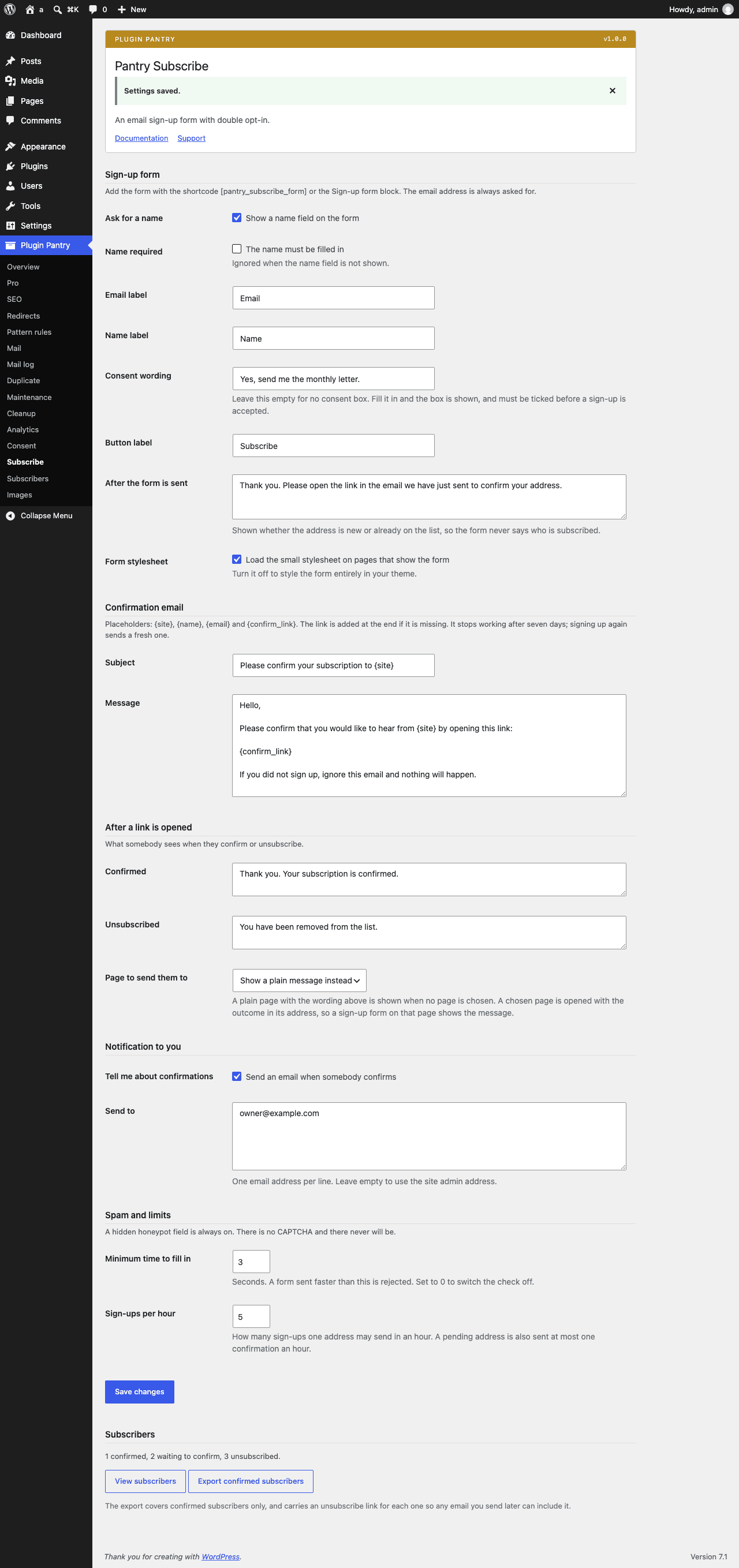
- Sign-up form as a block and a shortcode: email, optional name, optional consent checkbox with your wording
- Double opt-in: a confirmation email with a signed link that expires, and the subscriber only counts once confirmed
- Subscribers kept as a private post type with status pending, confirmed or unsubscribed, listed under the Plugin Pantry menu with search and a status filter
- Signed unsubscribe link handling, so any email you send later can carry one
- Honeypot, timing check and per-address rate limit, the same approach as Pantry Contact
- CSV export of confirmed subscribers, and deletion from the list
- Optional notification to you when someone confirms
What it does not do
- No newsletter sending, campaigns or templates
- No integrations with email services
- No segments, tags or automation
- No tracking pixels or open rates
- No CAPTCHA
Measured footprint
- Zip size
- 37 KB
- Lines of PHP
- 2,750
- Options
- pantry_subscribe_settings, pantry_subscribe_version
- Post meta
- _pantry_subscribe_status, _pantry_subscribe_name, _pantry_subscribe_source, _pantry_subscribe_ip, _pantry_subscribe_consent (only when the consent box is in use), _pantry_subscribe_confirmed (only once the address is confirmed)
- Custom tables
- none
- Post types
- pantry_subscriber
- Cron events
- none
- Transients
- pantry_subscribe_rl_<hashed address>, one hour, pantry_subscribe_resend_<subscriber id>, one hour
- Admin assets
- includes/core/assets/pantry-admin.css on the settings screen only, includes/core/assets/pantry-admin.js on the settings screen only, src/block/editor.js in the block editor only, assets/form.css in the block editor only, so the block preview matches the front end
- Front-end assets
- assets/form.css on pages that render the form, when the stylesheet setting is on
- External requests
- none
- Measured on
- 2026-09-12
Compatibility
- WordPress
- 6.4 or newer, tested to 7.1
- PHP
- 8.1 or newer
- Where it lives
- Plugin Pantry > Subscribe (and Subscribers)
- Licence
- GPLv2 or later
Documentation
Read the documentationEvery setting on the Pantry Subscribe screen and what each one does, with the hooks it publishes: the same text that ships in the plugin README.
Pro add-on (planned)
See Pantry Pro pricing- Hand-off of confirmed subscribers to Mailchimp, Kit, MailerLite or Resend audiences
- Plain-text campaigns sent in batches through Pantry Mail with an unsubscribe link
Planned for a later Pantry Pro release. Nothing in the free plugin waits on it, and a licence bought today covers it the day it ships, since one key covers every module.
Changelog
All notable changes to Pantry Subscribe are recorded here. The format follows Keep a Changelog, and the project uses Semantic Versioning.
1.0.0 - 2026-09-12
Added
- Sign-up form as the shortcode
[pantry_subscribe_form]and a server-rendered Sign-up form block, with an address field, an optional name field and an optional consent box with your own wording. - Double opt-in: a plain-text confirmation email carrying a signed link that expires after seven days, and a subscriber who only counts once confirmed.
- Signed unsubscribe links that never expire, published on each subscriber's screen and in the CSV export, so any email you send later can carry one.
- Subscribers kept as a private
pantry_subscriberpost type with the status pending, confirmed or unsubscribed, listed under the Plugin Pantry menu with search and a status filter. - CSV export of confirmed subscribers, nonced and capability checked, with the unsubscribe link on every row.
- Optional email to you when somebody confirms.
- Honeypot field, signed minimum-time check, nonce and a per address rate limit, the same approach as Pantry Contact. A pending address is sent at most one confirmation an hour.
- The same answer whether an address is new, pending or already confirmed, so the form never says who is on the list.
- Works without JavaScript: the form posts and redirects with the message. No front-end script at all, and about thirty lines of CSS that inherit the theme, loaded only on pages that show the form.