Plugins / Pantry Mail
Pantry Mail
v1.0.0Contents: SMTP delivery for wp_mail, with a test button.
20 KB, 1 external request
Point WordPress email at a real SMTP server and confirm it works with one test message. Provider presets fill in the host and port. The last twenty sends are listed with their result so you can see what went wrong.
Compared with the popular plugins
What it does
- SMTP host, port, encryption, username and password, applied through the phpmailer_init hook
- Presets for Gmail, Microsoft 365, SendGrid, Mailgun, Postmark, Resend, Amazon SES, Brevo and custom
- From name and from address override, with an option to force them on every message
- Send a test email from the settings screen and see the server response
- Log of the last 20 messages: time, recipient, subject, result and error text, stored in one option
- Password can be defined as the PANTRY_MAIL_PASSWORD constant in wp-config.php so it never touches the database; the screen says plainly where it is stored
What it does not do
- No OAuth flows
- No API-based sending (SMTP only)
- No sending queue or retries
- No open or click tracking
- No full searchable log
- No external requests other than the SMTP connection itself
Measured footprint
- Zip size
- 20 KB
- Lines of PHP
- 1,304
- Options
- pantry_mail_settings, pantry_mail_log
- Post meta
- none
- Custom tables
- none
- Post types
- none
- Cron events
- none
- Transients
- none
- Admin assets
- includes/core/assets/pantry-admin.css on the settings screen only, includes/core/assets/pantry-admin.js on the settings screen only, assets/admin.js on the settings screen only (preset autofill)
- Front-end assets
- none
- External requests
- SMTP connection to the configured host and port, only when SMTP is enabled
- Measured on
- 2026-09-12
Compatibility
- WordPress
- 6.4 or newer, tested to 7.1
- PHP
- 8.1 or newer
- Where it lives
- Settings > Pantry Mail
- Licence
- GPLv2 or later
Documentation
SMTP delivery for wp_mail, with a test button.
Point WordPress email at a real SMTP server and confirm it works with one test message. Provider presets fill in the host and port. The last twenty sends are listed with their result so you can see what went wrong.
Built to the Pantry Standard: one settings screen, one option for settings plus one bounded option for the log, no telemetry, no external requests other than the SMTP connection you configure.
Usage
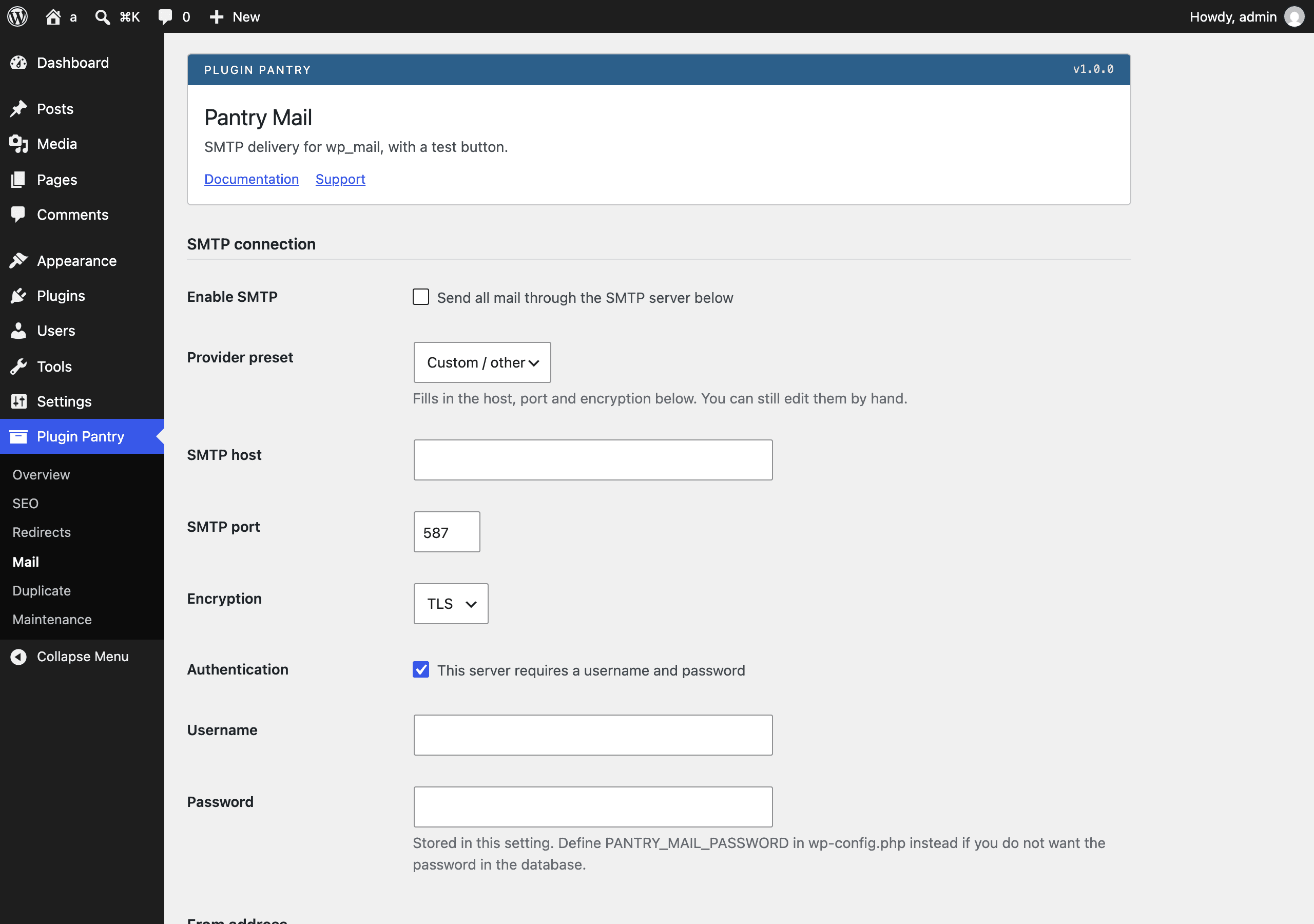
- Activate the plugin. Go to Settings > Pantry Mail.
- Tick Enable SMTP.
- Choose a Provider preset to fill in the host, port and encryption, or leave it on Custom / other and type them in yourself. You can still edit any of the filled-in fields by hand.
- Fill in Username and Password if the server requires authentication (leave Authentication ticked, which is the default).
- Optionally set a From name and From email under From address. These are used whenever a message would otherwise show WordPress's own default sender; tick Force on every message to override even a from address that another plugin sets explicitly.
- Save changes, then use Send a test email to confirm delivery. The result appears as a notice at the top of the screen, and every attempt (test or otherwise) is added to the Recent mail log below.
Storing the password outside the database
Add this to wp-config.php instead of typing the password into the settings
screen:
define( 'PANTRY_MAIL_PASSWORD', 'your-smtp-password' );
When this constant is defined, it is always used for the SMTP password and the Password field on the settings screen is ignored. The screen shows a notice when the constant is active.
Settings reference
All settings are stored in one option, pantry_mail_settings.
| Setting | Type | Default | Notes |
|---|---|---|---|
| Enable SMTP | checkbox | off | When off, WordPress sends mail with PHP's built-in mail() as usual. |
| Provider preset | select | Custom / other | UI convenience only; only the fields below are actually used to send mail. |
| SMTP host | text | (empty) | Required for SMTP to activate; if empty, the plugin makes no changes to PHPMailer. |
| SMTP port | number | 587 | 1-65535. |
| Encryption | select | TLS | None, SSL or TLS. Maps to PHPMailer's SMTPSecure. |
| Authentication | checkbox | on | When off, Username/Password are still set on PHPMailer but SMTPAuth is false. |
| Username | text | (empty) | |
| Password | password | (empty) | Ignored when PANTRY_MAIL_PASSWORD is defined; see above. |
| From name | text | (empty) | Applied when a message would otherwise use WordPress's own default name, or always when Force is on. |
| From email | (empty) | Applied when a message would otherwise use WordPress's own default wordpress@... address, or always when Force is on. |
|
| Force on every message | checkbox | off | Makes the From name/email above unconditional. |
The mail log
Every message WordPress attempts to send through wp_mail() is recorded,
whether or not SMTP is enabled, so the log is also useful for diagnosing
plain mail() delivery. Stored in its own bounded option, pantry_mail_log,
holding at most the 20 most recent attempts, newest first. Each entry has a
time, recipient, subject, result (sent or failed) and, for failures, the raw
PHPMailer error text. There is no separate log setting to turn this off.
Filters and actions
This plugin does not add any filters or actions of its own for other code to hook into. It hooks into five WordPress core hooks:
phpmailer_init— sets the SMTP connection details on PHPMailer.wp_mail_from/wp_mail_from_name— applies the From address override.wp_mail_succeeded/wp_mail_failed— writes the log entry.
The Send a test email button posts to admin-post.php with
action=pantry_mail_send_test, a nonce, and a pantry_mail_test_to field. On
completion it redirects back to the settings screen with pantry-mail-test
set to sent or failed in the URL.
What it does not do
See does_not in registry/plugins.json for the published list: no OAuth
flows, no API-based sending (SMTP only), no sending queue or retries, no open
or click tracking, no full searchable log, no external requests other than
the SMTP connection itself.
Note for reviewers
The WordPress.org Plugin Check tool reports the Amazon SES preset's hostname (email-smtp.us-east-1.amazonaws.com) as "offloaded content". It is a configuration value used to pre-fill the SMTP host field, not an asset loaded from a remote server. The plugin loads no scripts, styles or images from anywhere but its own folder.
Pro add-on (planned)
See Pantry Pro pricing- Full searchable log with resend
- Fallback account when the primary fails
- Failure alerts
- API senders for Resend, Postmark and SES
None of this is in the free plugin, and none of it is switched off inside it. Pro would be a separate plugin.
Changelog
All notable changes to Pantry Mail are documented in this file, in the Keep a Changelog format.
1.0.0 - 2026-09-12
Added
- SMTP host, port, encryption, username and password, applied through the
phpmailer_inithook. - Provider presets for Gmail, Microsoft 365, SendGrid, Mailgun, Postmark, Resend, Amazon SES and Brevo, plus Custom.
- From name and from address override, with a Force option to apply it on every message.
- Send a test email from the settings screen, with the result shown as a notice.
- Log of the last 20 messages: time, recipient, subject, result and error text, stored in one option.
- Password can be set with the
PANTRY_MAIL_PASSWORDconstant inwp-config.phpinstead of the database.