Skip to content
Plugin PantryPlugins

Plugins / Pantry Maintenance

Turn a clean holding page on and off. Maintenance mode sends the correct 503 status so search engines wait; coming-soon mode sends 200 with noindex. Logged-in editors still see the site. One built-in design, your logo, headline, message and colours.

Compared with the popular plugins
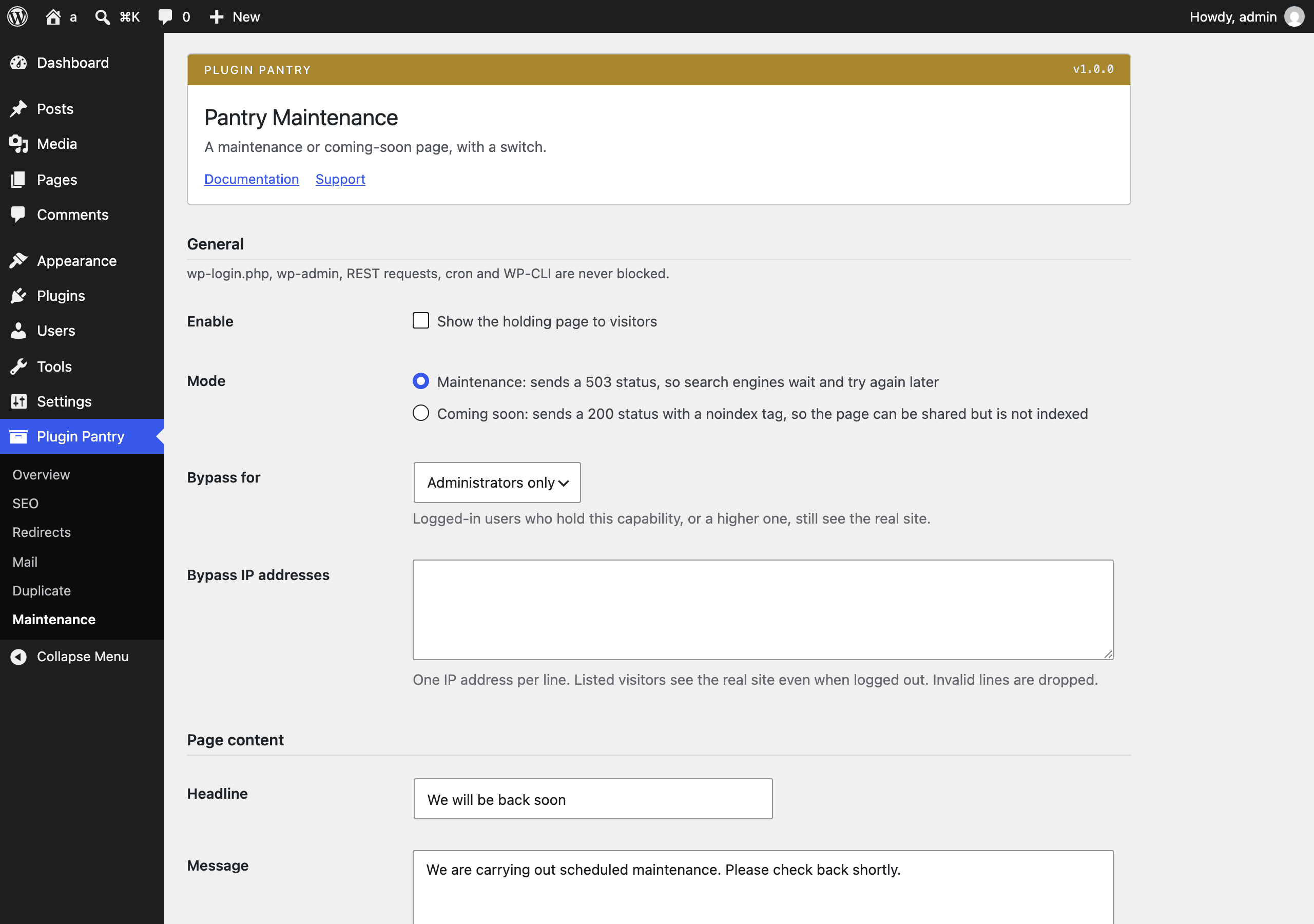
The Pantry Maintenance settings screen in the WordPress admin, at Settings > Pantry Maintenance.

What it does

  • Enable switch with a mode: maintenance (503 with Retry-After) or coming soon (200 with noindex)
  • Headline, message with basic formatting, logo from the media library, background and text colour
  • One built-in page design with inline CSS and no external assets
  • Bypass for logged-in users with a chosen capability and for a list of IP addresses
  • Never blocks wp-login.php, wp-admin, REST requests, cron or WP-CLI
  • Admin bar indicator while the page is active and a preview link on the settings screen

What it does not do

  • No template gallery
  • No countdown timer
  • No email capture
  • No page builder

Measured footprint

Zip size
19 KB
Lines of PHP
1,195
Options
pantry_maintenance_settings
Post meta
none
Custom tables
none
Post types
none
Cron events
none
Transients
none
Admin assets
includes/core/assets/pantry-admin.css on the settings screen only, includes/core/assets/pantry-admin.js on the settings screen only (media picker for the logo field)
Front-end assets
none
External requests
none
Measured on
2026-09-12

Compatibility

WordPress
6.4 or newer, tested to 7.1
PHP
8.1 or newer
Where it lives
Settings > Pantry Maintenance
Licence
GPLv2 or later

Documentation

A maintenance or coming-soon page, with a switch. Part of Plugin Pantry, built to the Pantry Standard.

What it does

  • One switch to show a holding page to visitors: Settings > Pantry Maintenance.
  • Two modes:
    • Maintenance sends a 503 Service Unavailable status with Retry-After: 3600, so search engines wait and try again later.
    • Coming soon sends a normal 200 status with <meta name="robots" content="noindex,nofollow">, so the page can be shared but is not indexed.
  • Headline, message (basic HTML formatting: links, bold, italic, paragraphs, lists), a logo from the media library, and a background and text colour.
  • One built-in page design. All CSS is inline in the page itself; nothing is loaded from outside the site.
  • Bypass for logged-in users who hold a capability you choose (from "any logged-in user" up to "administrators only"), and for a list of IP addresses.
  • Never blocks wp-login.php, wp-admin, REST requests, cron or WP-CLI, regardless of the switch.
  • An admin bar indicator ("Maintenance mode is on" / "Coming soon is on") while the page is active, linking back to the settings screen.
  • A preview link on the settings screen that shows the page exactly as a visitor would see it, without switching it on for anyone else.

What it does not do

  • No template gallery: one design.
  • No countdown timer.
  • No email capture.
  • No page builder.

These may appear in a separate Pantry Maintenance Pro add-on later. The free plugin keeps working as-is either way.

Usage

  1. Go to Settings > Pantry Maintenance.
  2. Set the headline, message, logo and colours under "Page content".
  3. Choose the mode and who bypasses the page under "General".
  4. Use Preview holding page to check it while logged in, without affecting visitors.
  5. Tick Enable and save.
  6. Turn it back off the same way when the work is done.
Choosing a mode

Use Maintenance while you are actively working on the site: the 503 status tells search engines this is temporary, and they will come back rather than dropping pages from their index.

Use Coming soon for a site that has not launched yet: a 200 status means the page itself can be indexed if you want that, but noindex keeps it out of search results until you turn the plugin off.

Bypass
  • Bypass for controls which logged-in users still see the real site: any logged-in user, authors and above, editors and above, or administrators only.
  • Bypass IP addresses is a plain list, one address per line. Anyone browsing from a listed address sees the real site even when logged out. Lines that are not a valid IP address are dropped when you save.

Filters

Both are for developers; neither changes default behaviour.

pantry_maintenance_visitor_ip

Filters the IP address checked against the bypass list. Useful on a site behind a proxy or CDN, where REMOTE_ADDR is not the visitor's real address.

add_filter( 'pantry_maintenance_visitor_ip', function ( string $ip ): string {
	if ( ! empty( $_SERVER['HTTP_CF_CONNECTING_IP'] ) ) {
		return sanitize_text_field( wp_unslash( $_SERVER['HTTP_CF_CONNECTING_IP'] ) );
	}
	return $ip;
} );
pantry_maintenance_page_data

Filters the data passed to the holding page template before it renders: mode, headline, message, logo (attachment ID), background and text (hex colours).

add_filter( 'pantry_maintenance_page_data', function ( array $data ): array {
	$data['headline'] = 'Back online at 3pm UTC';
	return $data;
} );

Support

https://thepluginpantry.com/support

Pro add-on (planned)

See Pantry Pro pricing
  • More page designs
  • Countdown timer
  • Email capture with export
  • Secret bypass link to share with clients

None of this is in the free plugin, and none of it is switched off inside it. Pro would be a separate plugin.

Changelog

All notable changes to this project are documented in this file, in the Keep a Changelog format.

1.0.0 - 2026-09-12

  • First release.
  • Maintenance mode (503 with Retry-After) and coming-soon mode (200 with noindex).
  • Headline, message, logo and colours for the holding page.
  • Bypass by capability and by IP address; wp-login.php, wp-admin, REST, cron and WP-CLI are always let through.
  • Admin bar indicator and a settings-screen preview link.