Plugins / Pantry Login
Pantry Login
v1.0.0Contents: Limit login attempts and move the login page.
25 KB, no external requests
Stop password guessing with a lockout after a few failed attempts, and move the login page to an address of your own. Errors stop revealing whether the username exists. Put your logo on the login form.
Compared with the popular plugins
What it does
- Lock out an IP and username after a set number of failed attempts within a window, for a set number of minutes
- Remaining-attempts message and a clear lockout message on the form
- Lockout log of the last 50 events with a masked IP, username and time, stored in one option
- Optional trust of a proxy header for the real IP, off by default
- Custom login address, with wp-login.php and direct wp-admin access for visitors sent to a 404
- Generic error message so the form never confirms a username
- Login form logo with a link to the home page
What it does not do
- No two-factor authentication
- No CAPTCHA
- No IP allow or deny lists
- No country blocking
- No external requests
Measured footprint
- Zip size
- 25 KB
- Lines of PHP
- 1,935
- Options
- pantry_login_settings, pantry_login_log, pantry_login_version
- Post meta
- none
- Custom tables
- none
- Post types
- none
- Cron events
- none
- Transients
- pantry_login_c_<md5 of address and username>, pantry_login_i_<md5 of address>, pantry_login_lp_<md5 of address and username>, pantry_login_li_<md5 of address>
- Admin assets
- includes/core/assets/pantry-admin.css on the settings screen only, includes/core/assets/pantry-admin.js on the settings screen only
- Front-end assets
- one inline style block on the login page, printed only when a logo is set
- External requests
- none
- Measured on
- 2026-09-12
Compatibility
- WordPress
- 6.4 or newer, tested to 7.1
- PHP
- 8.1 or newer
- Where it lives
- Settings > Pantry Login
- Licence
- GPLv2 or later
Documentation
Limit login attempts and move the login page.
Pantry Login counts failed logins, locks out the address that made them, stops the form from confirming which usernames exist, serves the login form at an address of your choosing, and puts your own logo above it.
Settings
Settings > Pantry Login. Everything lives on one screen, in one option
(pantry_login_settings).
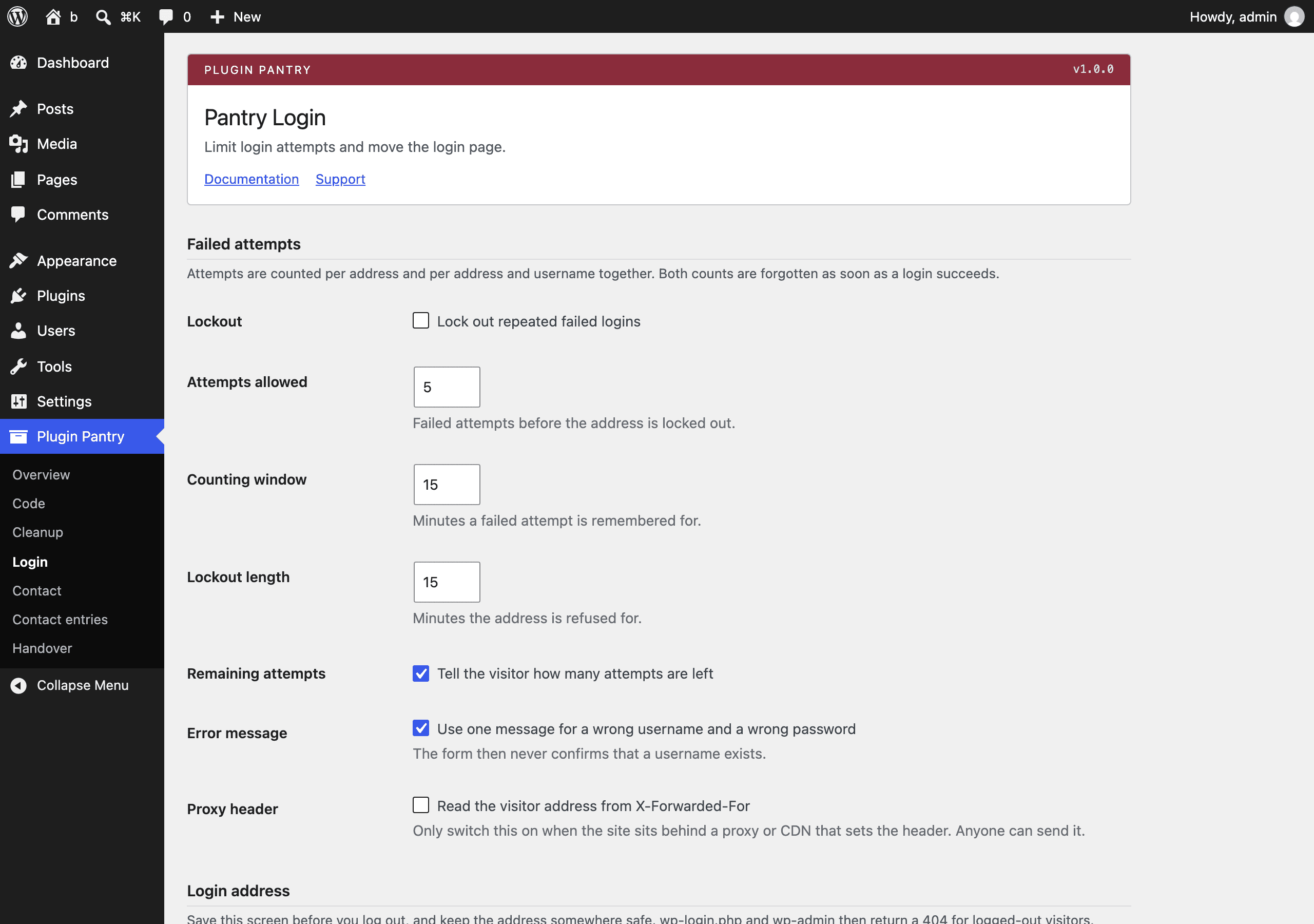
Failed attempts
| Setting | Default | What it does |
|---|---|---|
| Lockout | On | Turns the counting and the lockout on or off. Everything else in this section still applies to the message only when this is off. |
| Attempts allowed | 5 | Failed attempts before the address is locked out. |
| Counting window | 15 minutes | How long a failed attempt is remembered. Each new failure restarts the window. |
| Lockout length | 15 minutes | How long the address is refused for. |
| Remaining attempts | On | Adds "You have 3 attempts left" to the error on the form. |
| Error message | On | Replaces "unknown username" and "the password you entered for the username x is incorrect" with one message that says neither. |
| Proxy header | Off | Reads the visitor address from the first entry in X-Forwarded-For instead of REMOTE_ADDR. Only switch this on when a proxy or CDN in front of the site sets that header, because anyone can send it. |
Two counters run at once: one for the address, one for the address and username together. Whichever reaches the limit first starts the lockout, and both the address and that username are refused until it ends. A successful login clears both counters for that address. Counters and lockouts are transients, so they expire on their own and they never grow the database.
Login address
| Setting | Default | What it does |
|---|---|---|
| Custom address | Off | Serves the login form at your own address. |
| Address | my-login |
One path segment. Saved through sanitize_title(), so My Login becomes my-login. |
With this on, https://example.com/my-login/ shows the login form, and
wp-login.php and wp-admin return a 404 to anyone who is not logged in.
WordPress emits the new address everywhere it would have printed wp-login.php:
wp_login_url(), wp_logout_url(), wp_lostpassword_url(), the form action and
the links in emails. Logging out, password-protected posts and password-reset
links that carry a key still work through wp-login.php itself, because those
arrive from links that were sent before the address changed.
Save the screen before you log out, and keep the address somewhere safe. If you
lose it, add this to wp-config.php, load wp-login.php, and remove it again:
add_filter( 'option_pantry_login_settings', function ( $settings ) {
$settings['hide_login_enabled'] = false;
return $settings;
} );
The address is refused if it is empty, if WordPress reserves it (wp-admin,
wp-json and similar), or if a published post or page already uses it. In that
case the setting is switched back off and the screen says why.
Login form logo
| Setting | Default | What it does |
|---|---|---|
| Logo | none | Image shown above the login form instead of the WordPress logo. The link points at your home page and its text is the site name. |
| Logo width | 84px | Width in pixels. The height follows the image's own proportions. |
Nothing is printed on the login page unless a logo is set.
Lockout log
The last 50 lockouts are listed under the settings, newest first: when, the
address with its last octet (or last hextet) replaced by xxx, the username that
was tried, the attempts counted and how long the lockout was. The whole log is
one option, pantry_login_log, and it never holds more than 50 entries.
Two buttons sit under the table. Release every lockout deletes the lockouts and counters for every entry in the log, which is how you let someone back in before their lockout ends. Clear the log empties the table.
Hooks
pantry_login_locked
Fires when an address is locked out. The array holds the masked address, the username that was tried, the attempts counted, the lockout length in minutes and the timestamp it ends.
add_action( 'pantry_login_locked', function ( array $event ) {
error_log( sprintf( '%s locked out after %d attempts on %s', $event['ip'], $event['attempts'], $event['username'] ) );
} );
pantry_login_generic_message
Filters the one message that replaces the username-revealing errors.
add_filter( 'pantry_login_generic_message', function ( string $message ) {
return '<strong>' . esc_html__( 'Error:', 'my-theme' ) . '</strong> ' . esc_html__( 'Those details did not work.', 'my-theme' );
} );
What it stores
Three options (pantry_login_settings, pantry_login_log, pantry_login_version)
and transients named pantry_login_c_, pantry_login_i_, pantry_login_lp_ and
pantry_login_li_ followed by a hash. No tables, no post types, no cron events,
no post meta, and no request ever leaves your server. Uninstalling removes all of
it.
Scope
This plugin does not do two-factor authentication, CAPTCHAs, IP allow or deny lists, or country blocking, and it never calls out to another service.
Pro add-on (planned)
See Pantry Pro pricing- Two-factor authentication with recovery codes
- IP allow and deny lists
- Login notifications
- Cloudflare Turnstile
None of this is in the free plugin, and none of it is switched off inside it. Pro would be a separate plugin.
Changelog
All notable changes to Pantry Login are recorded here. The format follows Keep a Changelog, and the project uses semantic versioning.
1.0.0 - 2026-09-12
- First release.
- Lockout after a set number of failed attempts within a window, counted per address and per address and username together.
- Remaining-attempts message and a lockout message with the time left, shown on the login form.
- Lockout log of the last 50 events with a masked address, the username tried and the time, held in one option.
- Buttons to release every recorded lockout and to clear the log.
- Optional trust of the X-Forwarded-For header for sites behind a proxy, off by default.
- Custom login address, with wp-login.php and wp-admin returning a 404 to logged-out visitors.
- One generic error message so the form never confirms that a username exists.
- Login form logo linked to the home page.
pantry_login_lockedaction andpantry_login_generic_messagefilter.