Plugins / Pantry Redirects
Pantry Redirects
v1.0.0Contents: 301 and 302 redirects with a 404 log.
34 KB, no external requests
A redirect list you can read at a glance and a 404 log that shows what to fix. Add exact-path redirects, see how often they fire, and turn a logged 404 into a redirect with one click. Import and export as CSV.
Compared with the popular plugins
What it does
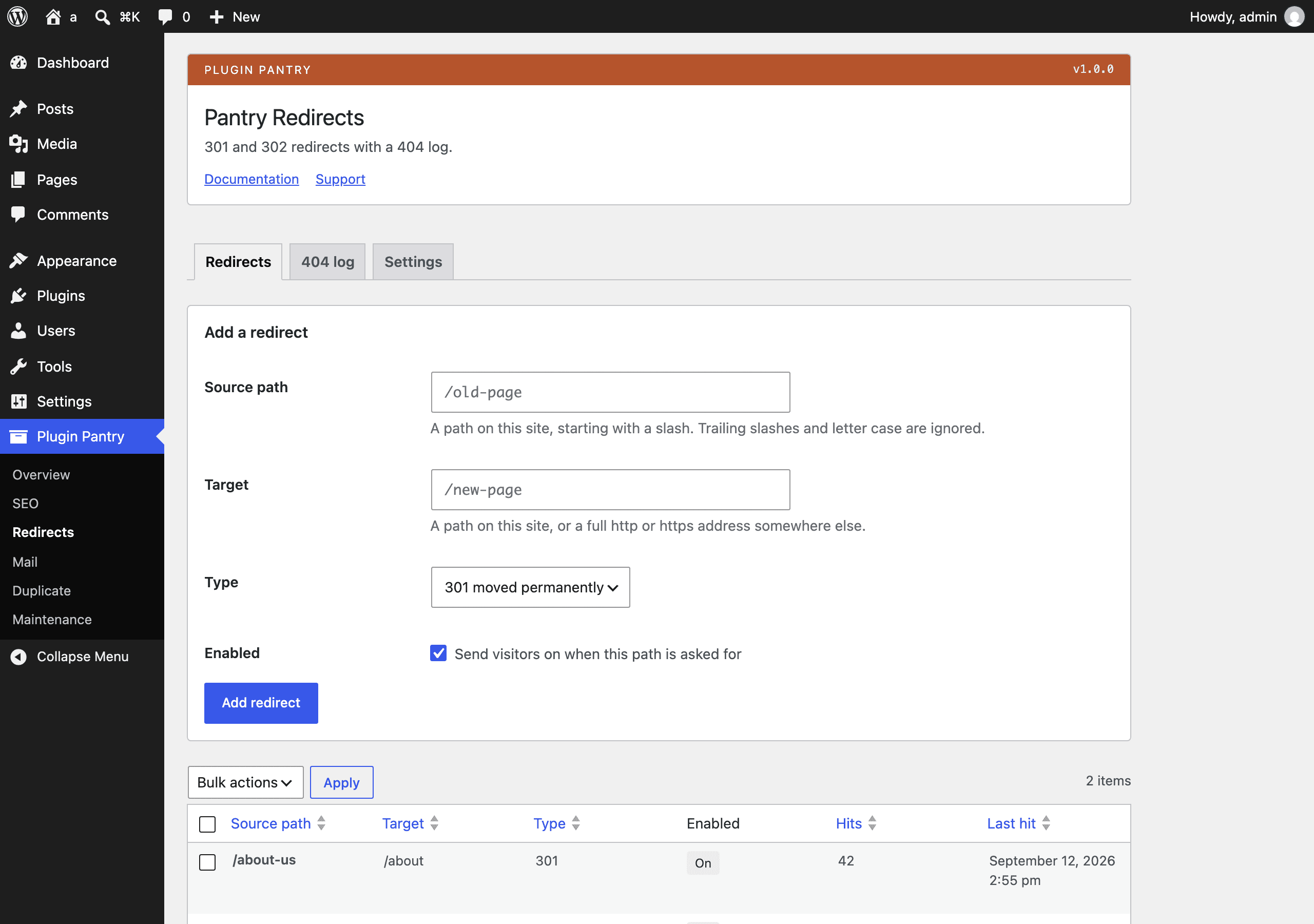
- Redirect list with source path, target URL, type (301, 302, 307), enabled switch and hit count
- Exact path matching that ignores trailing slashes and, optionally, query strings
- Validation that rejects redirect loops, self-redirects and duplicate sources
- 404 log of the last 200 unique paths with hit count and last-seen time, no visitor data stored
- One-click redirect from any 404 row, and one-click clear of the log
- CSV import and export of the redirect list
- Two custom tables, removed on uninstall
What it does not do
- No regular-expression redirects
- No automatic redirect when a slug changes
- No visitor tracking: no IP addresses, no user agents, no referrers stored
- No external requests
Measured footprint
- Zip size
- 34 KB
- Lines of PHP
- 2,913
- Options
- pantry_redirects_settings, pantry_redirects_db_version
- Post meta
- none
- Custom tables
- {prefix}pantry_redirects_rules, {prefix}pantry_redirects_log
- Post types
- none
- Cron events
- none
- Transients
- none
- Admin assets
- includes/core/assets/pantry-admin.css on Tools > Redirects only, includes/core/assets/pantry-admin.js on Tools > Redirects only
- Front-end assets
- none
- External requests
- none
- Measured on
- 2026-09-12
Compatibility
- WordPress
- 6.4 or newer, tested to 7.1
- PHP
- 8.1 or newer
- Where it lives
- Tools > Redirects
- Licence
- GPLv2 or later
Documentation
301 and 302 redirects with a 404 log.
A redirect list you can read at a glance and a 404 log that shows what to fix. Add exact-path redirects, see how often they fire, and turn a logged 404 into a redirect. Import and export as CSV.
Built to the Pantry Standard.
Where it lives
Tools > Redirects. One screen with three tabs:
- Redirects - the add or edit form, the redirect list, and CSV import and export.
- 404 log - paths that returned a 404, with a clear button.
- Settings - matching and logging options.
Everything needs the manage_options capability.
Adding a redirect
- Source path is a path on this site, starting with a slash:
/old-page. A trailing slash and letter case are ignored, so/Old-Page/and/old-pageare the same redirect. A source may carry a query string (/product?id=12) when you want to redirect one exact address. - Target is either a path on this site (
/new-page) or a full address somewhere else (https://example.com/new-page). - Type is 301 (permanent), 302 (found, temporary) or 307 (temporary).
- Enabled turns the redirect on. A disabled redirect stays in the list and does nothing.
The form refuses a source that is empty or is the home page, a target that is neither a path nor an http or https address, a source that already has a redirect, a redirect that points at itself, and a redirect that would send a visitor round in a loop. Loop checking follows the chain of redirects on this site for up to ten hops.
Redirects are matched on template_redirect at priority 1, before WordPress
decides the request is a 404, so a redirect wins over an existing page at the
same path.
The 404 log
Every front-end request that ends in a 404 has its path written to the log with a hit count and the time it was last seen. Nothing else is stored: no IP address, no user agent, no referrer, no user id.
These are never logged:
- Admin, AJAX, cron, REST and WP-CLI requests.
- The home page.
- Anything starting with
/wp-. - Anything ending in a common asset ending (
.css,.js,.png,.woff2and so on).
Create redirect on a log row opens the Redirects tab with that path already in the source box. Fill in the target and save. Delete removes one row, and Clear the log empties it.
When the log passes the limit in Settings, the paths seen longest ago are dropped.
Settings
| Setting | Default | What it does |
|---|---|---|
| Query strings | On | With this on, /old-page?utm_source=news matches a redirect whose source is /old-page. With it off, only a redirect whose source carries the same query string matches. A source with its own query string always wins over the bare path either way. |
| Default type | 301 | Pre-selected in the add form, and used for CSV rows that leave the type column out. |
| Logging | On | Turns 404 logging off without touching what is already logged. |
| Paths to keep | 200 | How many unique paths the log holds. Between 20 and 1000. |
CSV
Export CSV downloads every redirect as source,target,type,enabled, newest
id last.
Import CSV reads the same four columns. A header row is optional and is
skipped when the first cell reads source. A row whose source already exists
updates that redirect rather than adding a second one. The type column may be
left empty, in which case the default type from Settings is used. The enabled
column accepts 1, yes, true, on or enabled; anything else is off, and
a missing column is on.
Rows that fail the same validation as the form are skipped and counted in the notice. The file must be under one megabyte and at most 5000 rows are read.
source,target,type,enabled
/old-page,/new-page,301,1
/brochure.html,https://example.com/brochure,302,1
/retired,/,301,0
Filters and actions
All five are prefixed pantry_redirects_.
pantry_redirects_enabled
Turn redirect matching off for a request.
add_filter( 'pantry_redirects_enabled', function ( $enabled ) {
return is_user_logged_in() ? false : $enabled;
} );
pantry_redirects_target
Change the address a matched rule sends the visitor to. Return an empty string to cancel the redirect.
add_filter( 'pantry_redirects_target', function ( $url, $rule, $request ) {
return add_query_arg( 'from', rawurlencode( $request ), $url );
}, 10, 3 );
pantry_redirects_redirecting
Fires just before the header is sent, after the hit has been counted.
add_action( 'pantry_redirects_redirecting', function ( $rule, $url, $status ) {
error_log( sprintf( '%d to %s', $status, $url ) );
}, 10, 3 );
pantry_redirects_should_log
Decide whether one path is written to the 404 log.
add_filter( 'pantry_redirects_should_log', function ( $should_log, $path ) {
return 0 === strpos( $path, '/feed' ) ? false : $should_log;
}, 10, 2 );
pantry_redirects_asset_endings
Replace the list of file endings that are never logged.
add_filter( 'pantry_redirects_asset_endings', function ( $endings ) {
$endings[] = 'pdf';
return $endings;
} );
What it stores
Two options, pantry_redirects_settings and pantry_redirects_db_version, and
two tables, {prefix}pantry_redirects_rules and {prefix}pantry_redirects_log.
No post meta, no custom post types, no cron events, no transients, no external
requests.
Uninstalling removes all four, on every site of a network.
Notes for the curious
- Matching costs one indexed
SELECTon the rules table per front-end request, and a second one only when the request has a query string and the query string option is on. Nothing is cached, so a redirect works the moment it is saved. Plugin::boot()runs onplugins_loadedand hooksinitat priority 5, where it builds the objects. The menu title and every field label are translatable, and WordPress 6.7 and newer log a notice when a text domain is used beforeinit. Every hook this plugin needs fires afterinit, so nothing is lost by waiting.wp_http_validate_url()is deliberately not used to check targets. It resolves the host through DNS and refuses private addresses, which would break a redirect to a staging host and would count as an external request. Targets are checked structurally instead: a path must start with a slash, and an address must parse to an http or https scheme with a host.wp_redirect()is used rather thanwp_safe_redirect()because a redirect to another site is a normal thing to want. The target is validated when it is saved by a user withmanage_options.
Why this plugin is over the line limit
The Pantry Standard aims for under 1,500 lines of PHP per plugin and asks for a
written reason above 2,000. This one measures 2,893 lines, counted with
find plugins/pantry-redirects -name '*.php' -not -path '*/tests/*' | xargs cat | wc -l.
The reason, in order of size:
- 565 lines are the vendored
includes/coresettings class, which is shared and not written here. - 355 lines are the two
WP_List_Tablesubclasses. The scope asks for a redirect list and a 404 log, and each list needs its own columns, sortable columns, row actions, bulk actions and empty-state text. There is no smaller way to get a native WordPress list. - 522 lines are the admin write paths in one class: the add and edit handler, the row and bulk handlers, the CSV reader, the CSV writer, the validator, and the notice texts. The notice map alone is 70 lines because every outcome gets a sentence a person can act on rather than a code.
- 453 lines are the database layer. Ordering and paging are written out twice, once ascending and once descending, because the coding standard will not allow a direction to be concatenated into a prepared statement.
- The rest is path normalisation shared by the front end and the admin, the screen markup, and one docblock per method.
Nothing here is dead code or a feature outside the scope contract. If the limit has to be met, the honest cut is the 404 log, which would move the plugin back under 1,900 lines and remove half of what it is for.
Pro add-on (planned)
See Pantry Pro pricing- Regular-expression and wildcard rules
- Automatic redirects when a permalink changes
- Scheduled log clean-up and email digests
None of this is in the free plugin, and none of it is switched off inside it. Pro would be a separate plugin.
Changelog
All notable changes to Pantry Redirects are recorded here. The format follows Keep a Changelog and the project uses semantic versioning.
1.0.0 - 2026-09-12
- First release.
- Redirect list with source path, target, type (301, 302, 307), an enabled switch, a hit count and the time of the last hit.
- Exact path matching that ignores trailing slashes and letter case, with an option to ignore query strings.
- Validation that rejects an empty or home-page source, a bad target, a duplicate source, a self-redirect and a redirect loop.
- 404 log of the most recently seen unique paths with a hit count and the time last seen. No IP addresses, user agents or referrers are stored.
- Create redirect from any logged 404 row, delete single rows, and clear the whole log.
- CSV import and export of the redirect list.
- Two custom tables, both dropped on uninstall.