Plugins / Pantry Contact
Pantry Contact
v1.0.0Contents: One contact form. Entries saved. Spam trapped.
31 KB, no external requests
A single contact form that works out of the box. Tick the fields you want, drop in the shortcode or block, and every message is emailed to you and kept in the dashboard. Spam is caught with a honeypot and a timing check, not a CAPTCHA.
Compared with the popular plugins
What it does
- One form with a fixed field set: name, email, phone, subject, message, consent checkbox; each can be enabled, required and relabelled
- Shortcode and a block that renders on the server with no build step
- Honeypot field, minimum-time check, nonce and a per-address rate limit
- Entries saved as a private post type with a list table showing sender, subject and date, and a CSV export
- Notification email to one or more addresses with reply-to set to the sender
- Works without JavaScript: the form posts and redirects with a success message; a small script submits inline when available
- About thirty lines of CSS that inherit the theme, loaded only on pages that show the form
What it does not do
- No second form
- No custom fields or field builder
- No file uploads
- No third-party integrations
- No CAPTCHA
Measured footprint
- Zip size
- 31 KB
- Lines of PHP
- 2,256
- Options
- pantry_contact_settings, pantry_contact_version
- Post meta
- _pantry_contact_name, _pantry_contact_email, _pantry_contact_phone, _pantry_contact_consent, _pantry_contact_source, _pantry_contact_ip
- Custom tables
- none
- Post types
- pantry_entry
- Cron events
- none
- Transients
- pantry_contact_rl_<hashed address>, one hour
- Admin assets
- includes/core/assets/pantry-admin.css on the settings screen only, includes/core/assets/pantry-admin.js on the settings screen only, src/block/editor.js in the block editor only, assets/form.css in the block editor only, so the block preview matches the front end
- Front-end assets
- assets/form.css on pages that render the form, when the stylesheet setting is on, assets/form.js on pages that render the form, when inline submit is on
- External requests
- none
- Measured on
- 2026-09-12
Compatibility
- WordPress
- 6.4 or newer, tested to 7.1
- PHP
- 8.1 or newer
- Where it lives
- Contact (top level, owns the entries post type)
- Licence
- GPLv2 or later
Documentation
One contact form. Entries saved. Spam trapped.
A single contact form with a fixed field set. Tick the fields you want, put the shortcode or the block on a page, and every message is emailed to you and kept in the dashboard. Spam is caught with a honeypot, a timing check and a per address rate limit. There is no CAPTCHA and no second form.
Using it
- Activate the plugin. A Contact menu appears with Entries and Settings.
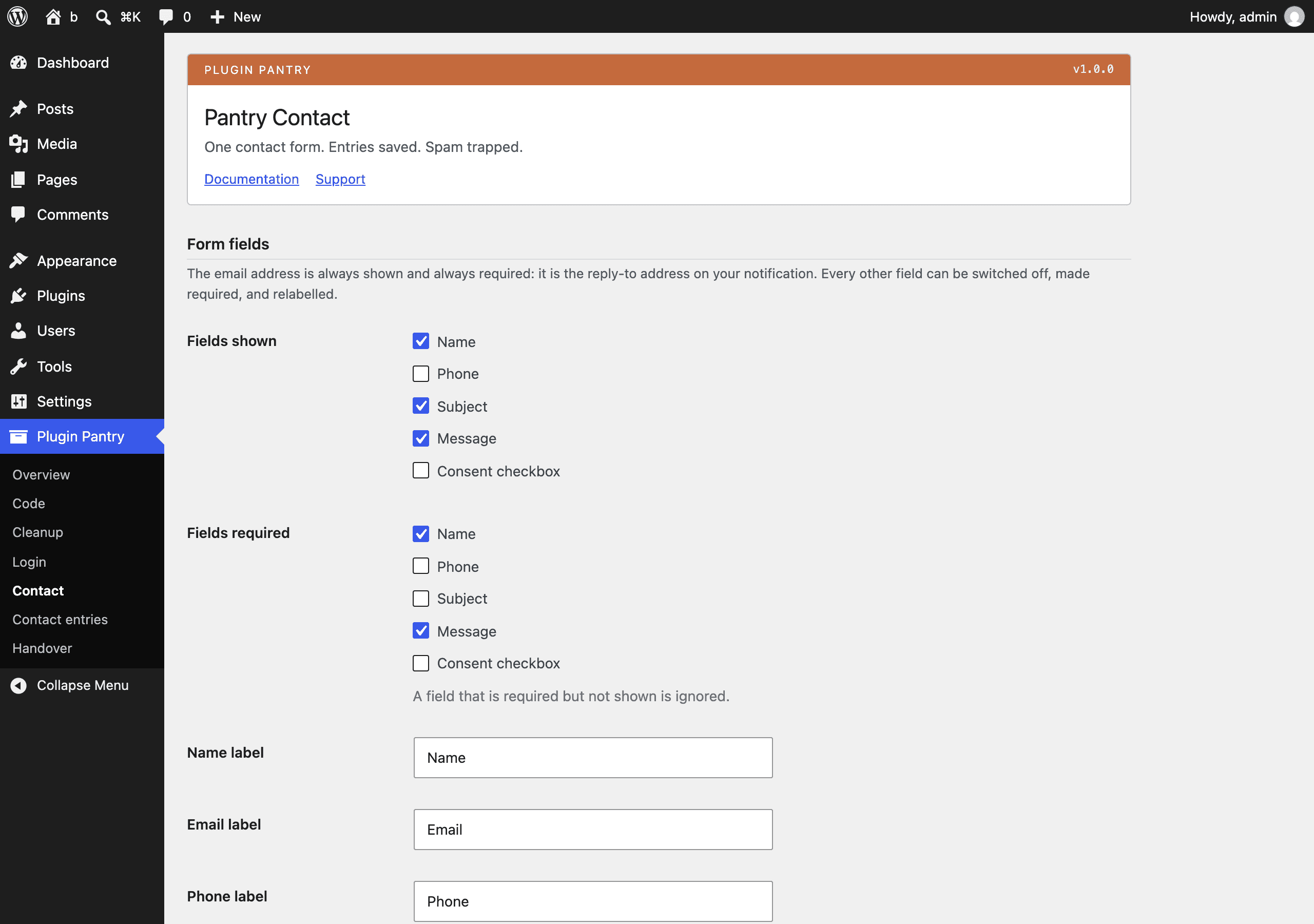
- Open Contact > Settings and choose the fields, the wording and where the notification goes.
- Put the form on a page, either way round:
- the shortcode
[pantry_contact_form] - the block Contact form (under Widgets in the inserter)
- the shortcode
The email address field is always shown and always required: it is the
Reply-To address on the notification, so you can answer the message straight
from your inbox.
Without JavaScript
The form is a plain POST to the page it sits on. The handler checks it,
stores it, sends the email and redirects back to the same page with
?pantry-contact=sent, where the success message is shown in place of the
form. Nothing about this needs JavaScript.
When JavaScript is available and Inline submit is on, a small script sends
the same request to admin-ajax.php and swaps the form for the message without
reloading. If the request fails, the browser falls back to the plain post.
Spam handling
Four checks run in this order, before anything is stored:
- Nonce. A WordPress nonce tied to the form.
- Honeypot. A hidden
pantry_contact_websitefield that must stay empty. - Timing. A signed timestamp is put in the form when it is rendered. The
signature is a
wp_hash()of the timestamp, so it cannot be forged, and the message is rejected if it comes back faster than the minimum time or more than a day later. - Rate limit. A transient counts submissions per address per hour. The address is hashed with a salt before it is used as a key.
The visitor's address is never stored in full. The last block is dropped
(203.0.113.45 becomes 203.0.113.0) before it is saved with the entry or put
in the notification email.
Settings
All on Contact > Settings, stored in one option, pantry_contact_settings.
Form fields
| Setting | Default | What it does |
|---|---|---|
| Fields shown | Name, Subject, Message | Which of Name, Phone, Subject, Message and Consent appear. Email is always shown. |
| Fields required | Name, Message | Which of those must be filled in. A field that is required but not shown is ignored. |
| Name label | Name | Label for the name field. |
| Email label | Label for the email field. | |
| Phone label | Phone | Label for the phone field. |
| Subject label | Subject | Label for the subject field. Also becomes the entry title. |
| Message label | Message | Label for the message field. |
| Consent wording | I agree to this site storing my message so that it can reply. | The text next to the consent checkbox. |
Form behaviour
| Setting | Default | What it does |
|---|---|---|
| Button label | Send message | Text on the submit button. |
| Success message | Thank you. Your message has been sent. | Shown after a message goes through. |
| Form stylesheet | On | Loads assets/form.css on pages that show the form. Turn it off to style the form entirely in your theme. The block editor loads it either way so the preview matches. |
| Inline submit | On | Loads assets/form.js so the form submits without a page reload. |
Notification email
| Setting | Default | What it does |
|---|---|---|
| Send to | empty | One address per line. Empty means the site admin address. Anything that is not a valid address is dropped on save. |
| Email subject | New enquiry from {site} | Placeholders {site}, {name} and {subject} are replaced. |
Spam and limits
| Setting | Default | What it does |
|---|---|---|
| Minimum time to fill in | 3 | Seconds. A form sent faster than this is rejected. 0 switches the check off. |
| Messages per hour | 5 | How many messages one address may send in an hour. |
| Keep entries | On | Save messages in the dashboard. Off means the notification email only. |
Entries
Every accepted message becomes one pantry_entry post: the subject is the
title, the message is the content, and the rest is post meta. The list table
shows the subject, the sender and the first few words of the message. Only
users with manage_options can see or edit them, and nothing can create one
from the admin screens: entries only come from the form.
Export CSV sits above the list and on the settings screen. It goes through
admin-post.php with a nonce and a capability check, and streams every entry
as CSV with the date, subject, name, email, phone, consent, message, page and
masked address.
Filters and actions
Everything is prefixed pantry_contact_.
pantry_contact_email_to filters the notification recipients.
add_filter( 'pantry_contact_email_to', function ( array $to ): array {
$to[] = 'sales@example.com';
return $to;
} );
pantry_contact_email_subject filters the subject after the placeholders are
replaced. Second argument is the sanitised field values.
add_filter( 'pantry_contact_email_subject', function ( string $subject, array $data ): string {
return '[Website] ' . $subject;
}, 10, 2 );
pantry_contact_email_body filters the plain text body, and
pantry_contact_email_headers filters the headers array. Both take the field
values as a second argument.
add_filter( 'pantry_contact_email_headers', function ( array $headers ): array {
$headers[] = 'Bcc: archive@example.com';
return $headers;
}, 10, 1 );
pantry_contact_errors filters the validation errors, an array of field key to
error code, before the message is accepted. Add to it to reject a message.
add_filter( 'pantry_contact_errors', function ( array $errors, array $data ): array {
if ( false !== strpos( $data['message'] ?? '', 'http://' ) ) {
$errors['message'] = 'required';
}
return $errors;
}, 10, 2 );
pantry_contact_success_message filters the wording shown after a send.
pantry_contact_submitted fires after a message is stored and emailed, with
the field values and the entry ID (0 when entries are not kept).
add_action( 'pantry_contact_submitted', function ( array $data, int $entry ): void {
error_log( 'New enquiry stored as ' . $entry );
}, 10, 2 );
pantry_contact_entry_created fires with the entry ID and the field values
just after the entry is stored.
pantry_contact_rejected fires with the reason a submission was turned away:
nonce, spam, too_fast, expired, rate, required or email.
add_action( 'pantry_contact_rejected', function ( string $code ): void {
if ( 'rate' === $code ) {
error_log( 'Contact form rate limit hit' );
}
} );
What it stores
- Options:
pantry_contact_settings,pantry_contact_version - Post type:
pantry_entry - Post meta:
_pantry_contact_name,_pantry_contact_email,_pantry_contact_phone,_pantry_contact_consent,_pantry_contact_source,_pantry_contact_ip - Transients:
pantry_contact_rl_<hash>, one hour each - No custom tables, no cron events, no external requests
Uninstalling removes all of it, entries included.
Why this one is over 2,000 lines of PHP
The Pantry Standard aims for under 1,500 lines of PHP per plugin including the
vendored core, and asks for a written reason above 2,000. This plugin measures
2,249 lines: 573 of those are the vendored includes/core settings screen, and
1,676 are the plugin itself.
The reason is that a contact form is four surfaces, not one: the settings
screen (400 lines, most of it the field declarations the standard asks to be
written as data), the form renderer (210), the submission handler with its four
spam checks, validation and notification email (444), and the entries post type
with its list table and CSV export (389). Cutting any of them would cut
something in the does list. The alternative, splitting entries into a second
plugin, would make a contact form that cannot show you your messages.
What it does not do
No second form, no field builder, no file uploads, no third-party integrations, no CAPTCHA. Those are out of scope by design; see the Pantry Standard.
Pro add-on (planned)
See Pantry Pro pricing- Multiple forms and custom fields
- File uploads
- Cloudflare Turnstile
- Webhooks and mailing list integrations
None of this is in the free plugin, and none of it is switched off inside it. Pro would be a separate plugin.
Changelog
All notable changes to Pantry Contact are recorded here. The format follows Keep a Changelog, and the project uses Semantic Versioning.
1.0.0 - 2026-09-12
Added
- One contact form with a fixed field set: name, email, phone, subject, message and a consent checkbox, each shown, required and relabelled from one screen.
- Shortcode
[pantry_contact_form]and a server-rendered Contact form block with no build step. - Honeypot field, signed minimum-time check, nonce and a per address rate limit.
- Entries stored as a private
pantry_entrypost type with a list table showing sender, subject and date, plus a nonced CSV export. - Notification email to one or more addresses with Reply-To set to the sender.
- Works without JavaScript: the form posts and redirects with a success message. A small script submits inline when JavaScript is available.
- About thirty lines of CSS that inherit the theme, loaded only on pages that show the form.