Skip to content
Plugin PantryPlugins

Plugins / Pantry Code

Plugin Pantry

Pantry Code

v1.0.0

Contents: Scripts and snippets in the head, body and footer.

18 KB, no external requests

Three boxes: head, after the opening body tag, and footer. Paste analytics, verification tags or a snippet and it prints exactly where you put it. Each post and page can add its own. Only users allowed to publish unfiltered HTML can edit them.

Compared with the popular plugins
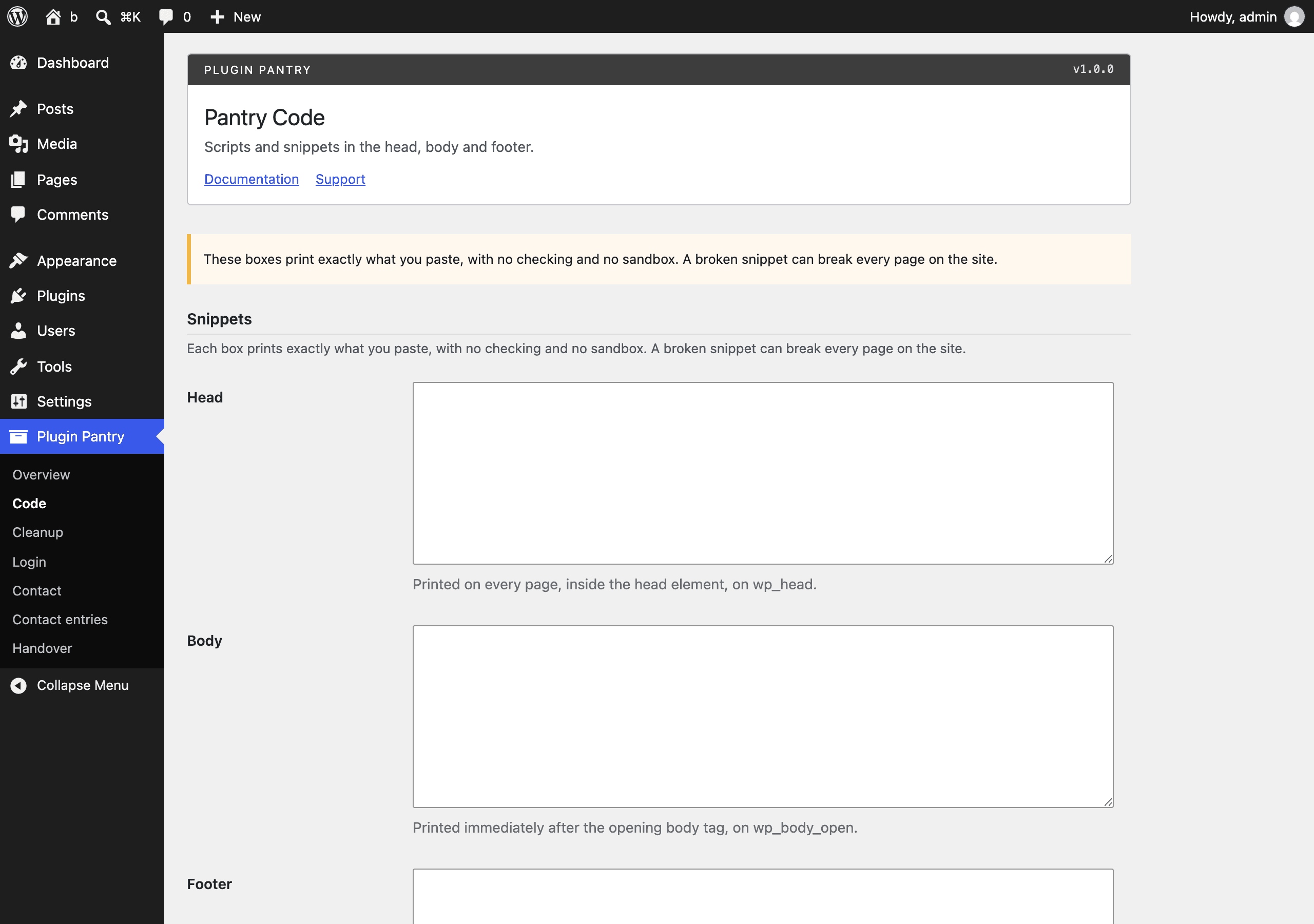
The Pantry Code settings screen in the WordPress admin, at Settings > Pantry Code.

What it does

  • Site-wide head, body-open and footer snippets, printed on wp_head, wp_body_open and wp_footer
  • Per-post snippets for the same three positions from a meta box on every public post type
  • Editing requires the unfiltered_html capability; the screen is read-only without it and when DISALLOW_UNFILTERED_HTML is set
  • Option to skip logged-in users, useful for analytics
  • Never prints on admin, login or REST responses
  • Plain warning on the screen that the snippets run as written

What it does not do

  • No PHP execution
  • No conditional rules
  • No snippet library
  • No tag manager helpers

Measured footprint

Zip size
18 KB
Lines of PHP
1,115
Options
pantry_code_settings
Post meta
pantry_code_head, pantry_code_body, pantry_code_footer
Custom tables
none
Post types
none
Cron events
none
Transients
none
Admin assets
includes/core/assets/pantry-admin.css and pantry-admin.js, enqueued only on the Settings > Pantry Code screen
Front-end assets
none
External requests
none
Measured on
2026-09-12

Compatibility

WordPress
6.4 or newer, tested to 7.1
PHP
8.1 or newer
Where it lives
Settings > Pantry Code
Licence
GPLv2 or later

Documentation

Scripts and snippets in the head, body and footer. Nothing else.

What it does

  • One settings screen (Settings > Pantry Code) with three boxes: Head, Body and Footer. Whatever you paste prints exactly where the label says, on every front-end page.
    • Head prints on wp_head.
    • Body prints on wp_body_open, immediately after the opening <body> tag (on any theme that calls wp_body_open(), which every WordPress default theme since 5.2 does).
    • Footer prints on wp_footer, just before </body>.
  • A meta box with the same three boxes on every public post type, for a snippet that should only run on that one post or page. Per-post snippets print in addition to the site-wide ones, in the same three positions.
  • An "Options" section with one switch: skip printing any snippet for logged-in users, useful for analytics you do not want counting your own visits.
  • Editing either the settings screen or the meta box requires the unfiltered_html capability. Without it, or when the DISALLOW_UNFILTERED_HTML constant is set to true, both screens show the fields as read-only with a notice, and the server refuses to save any change to the snippet content even if a request is sent directly (other settings, such as the logged-in switch, still save).
  • Snippets never print in wp-admin, on wp-login.php, or on a REST API response.

What it does not do

  • No PHP execution: snippets are HTML/CSS/JS text, printed as-is.
  • No conditional rules by post type, URL, role or device.
  • No snippet library or list of saved, individually-toggled snippets.
  • No tag manager helpers.

These are deliberate scope limits from the Pantry Standard, not missing features. See does_not in the plugin's registry entry and https://thepluginpantry.com/standard.

Usage

  1. Activate the plugin.
  2. Go to Settings > Pantry Code.
  3. Paste your snippet (a <script> tag, a <meta> verification tag, an analytics stub, and so on) into the box for the position you want: Head, Body or Footer.
  4. Save. The snippet prints on every front-end page from then on.
  5. To scope a snippet to one post or page, open that post's editor and use the "Pantry Code snippets" meta box near the bottom of the screen. Those three boxes work the same way but only print on that single post.

Only users who can publish unfiltered HTML (by default, Administrators on a single site; nobody on a subsite of a multisite network) can edit or save snippet content. Everyone else sees the same three boxes, but read-only.

Storage

  • Settings are stored in one option, pantry_code_settings, holding head_snippet, body_snippet, footer_snippet and skip_logged_in.
  • Per-post snippets are stored as three post meta keys: pantry_code_head, pantry_code_body and pantry_code_footer.
  • Snippet text is stored exactly as submitted, with wp_unslash() only. It is not filtered, escaped or checked in any way, on the way in or on the way out. That is the point of the plugin: what you paste is what runs. Treat the unfiltered_html capability accordingly.

Hooks

Pantry Code adds no filters or actions of its own. It hooks into the standard WordPress wp_head, wp_body_open, wp_footer, add_meta_boxes and save_post hooks, and reads the built-in unfiltered_html capability and the DISALLOW_UNFILTERED_HTML constant. There is nothing plugin-specific to filter.

Uninstall

Deleting the plugin through the Plugins screen removes the pantry_code_settings option and the three pantry_code_* post meta keys from every post. There are no custom tables, post types or cron events.

Pro add-on (planned)

See Pantry Pro pricing
  • Conditional rules by post type, URL, role and device
  • Google Tag Manager and GA4 helpers
  • Snippet library with enable switches

None of this is in the free plugin, and none of it is switched off inside it. Pro would be a separate plugin.

Changelog

All notable changes to Pantry Code are documented here. Format follows Keep a Changelog.

1.0.0 - 2026-09-12

  • Site-wide head, body-open and footer snippets, printed on wp_head, wp_body_open and wp_footer.
  • Per-post snippets for the same three positions from a meta box on every public post type.
  • Editing requires the unfiltered_html capability; the screen is read-only without it and when DISALLOW_UNFILTERED_HTML is set.
  • Option to skip logged-in users.
  • Never prints on admin, login or REST responses.
  • Plain warning on the settings screen that snippets run as written.