Plugins / Pantry Analytics
Pantry Analytics
v1.0.0Contents: The GA4 tag, placed properly, with consent defaults.
19 KB, 1 external request
Google Analytics 4 without a dashboard. Enter the measurement ID and the tag prints in the right place on the front end, with Google Consent Mode defaults so nothing is stored until a visitor agrees, and with the roles you choose left out of the numbers. The site's own server never talks to Google.
What it does
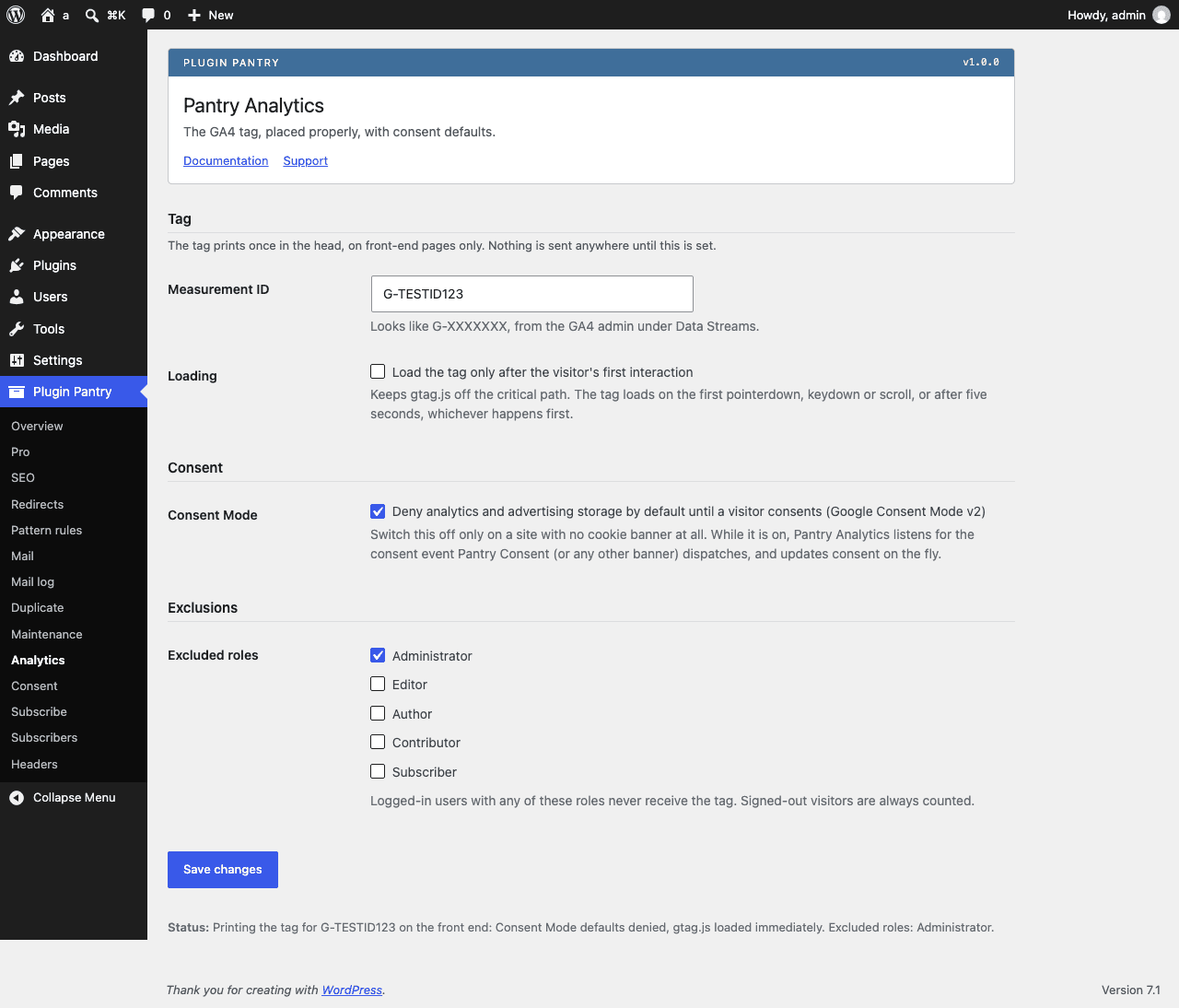
- Measurement ID field with validation, and the gtag.js tag printed once in the head on front-end pages only
- Never printed in wp-admin, on the login screen, in feeds, embeds or REST responses
- Exclude logged-in roles from tracking, administrators excluded by default
- Google Consent Mode v2 defaults: analytics and advertising storage denied until consent is granted, switchable off for sites without a banner
- Listens for the consent event Pantry Consent (or any banner) dispatches and updates consent on the fly
- Option to load the tag only after the visitor's first interaction, for sites that want it off the critical path
- One status line on the settings screen saying exactly what is printed
What it does not do
- No dashboard, charts or reports inside WordPress
- No Google account connection and no server-side requests to Google
- No other analytics vendors
- No cookie banner (see Pantry Consent)
- No event tracking beyond what GA4 does itself
Measured footprint
- Zip size
- 19 KB
- Lines of PHP
- 1,252
- Options
- pantry_analytics_settings
- Post meta
- none
- Custom tables
- none
- Post types
- none
- Cron events
- none
- Transients
- none
- Admin assets
- includes/core/assets/pantry-admin.css and pantry-admin.js, enqueued only on the Settings > Pantry Analytics screen
- Front-end assets
- none
- External requests
- the visitor's browser loads gtag.js from Google when the tag is printed; the server makes no request
- Measured on
- 2026-09-12
Compatibility
- WordPress
- 6.4 or newer, tested to 7.1
- PHP
- 8.1 or newer
- Where it lives
- Plugin Pantry > Analytics
- Licence
- GPLv2 or later
Documentation
Read the documentationEvery setting on the Pantry Analytics screen and what each one does, with the hooks it publishes: the same text that ships in the plugin README.
Pro add-on (planned)
See Pantry Pro pricing- Dashboard widget with top pages and sources from the GA4 Data API, after connecting a Google account
- Custom event helpers for forms, downloads and outbound links
Planned for a later Pantry Pro release. Nothing in the free plugin waits on it, and a licence bought today covers it the day it ships, since one key covers every module.
Changelog
All notable changes to Pantry Analytics are documented here. Format follows Keep a Changelog.
1.0.0 - 2026-09-12
- Measurement ID field with validation; the gtag.js tag prints once in the head, on front-end pages only.
- Never prints in wp-admin, on wp-login.php, in feeds, embeds or REST responses.
- Exclude logged-in roles from tracking; administrators excluded by default.
- Google Consent Mode v2 defaults (analytics and advertising storage denied until consent), switchable off.
- Listens for the
pantry-consentevent (dispatched by Pantry Consent or any other banner) and updates consent on the fly. - Option to load the tag only after the visitor's first interaction (pointerdown, keydown, scroll, or a five-second fallback).
- One status line on the settings screen saying exactly what is printed.